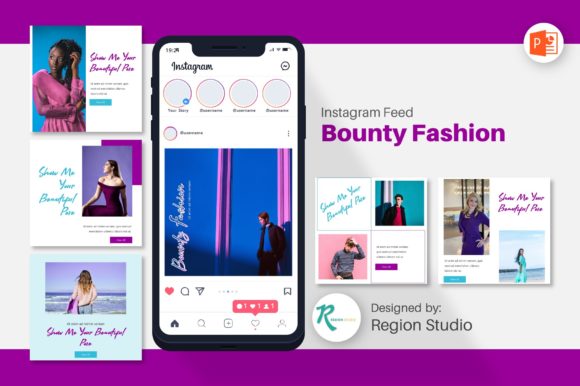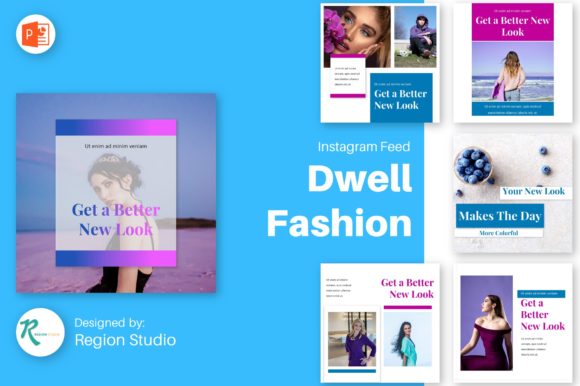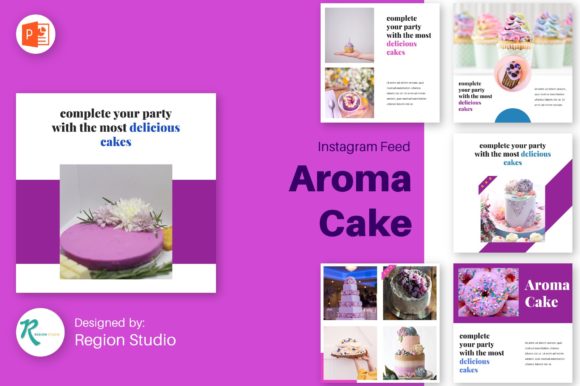
Instagram Feed - Aroma Cake: A Template for Sweet Success
Imagine scrolling through your Instagram feed and stopping, captivated by a grid that feels cohesive, vibrant, and utterly professional. The colors pop, the layout flows, and every post tells a piece of a larger, delicious story. For creators in the culinary, fashion, or lifestyle space, this visual harmony isn't just nice to have—it's a critical part of building a brand that resonates. The "Instagram Feed - Aroma Cake" template is designed to bridge the gap between a scattered collection of posts and a curated, magazine-worthy feed that commands attention and builds trust.
This isn't just another set of slides; it's a strategic toolkit for visual storytelling. Built for the 1080px by 1080px square format that Instagram favors, the template provides a modern, elegant foundation. The layouts are inherently creative, offering a professional structure that feels unique without being overly complicated. Whether you're a bakery showcasing a new line of pastries, a fashion blogger highlighting a seasonal collection, or a small business owner promoting a product launch, the template's adaptability is its core strength. It transforms the often-daunting task of feed planning into a simple drag-and-drop process.
Beyond the Bakery: Unlocking Versatile Design Applications
While its name evokes the sweet world of desserts, the utility of this template extends far beyond cakes and ice cream. Its clean, modern typography and flexible placeholder system make it a powerful asset for a wide array of creative and commercial projects. Think of it as a blank canvas with pre-drawn, elegant lines.
For a brand identity project, you can use the slides to mock up how your logo, color palette, and messaging will live across social platforms. A graphic designer can quickly assemble a visual mood board for client presentations, showing how different elements interact. The template's structure is ideal for creating marketing assets like promotional carousels, announcement graphics, or behind-the-scenes peeks that maintain a consistent aesthetic. Even for editorial design, a blogger can map out a week's worth of content, ensuring a balanced mix of quotes, product shots, and lifestyle images.
The practical applications are numerous:
- Social Media Graphics: Design a month's worth of Instagram posts in one sitting, guaranteeing a cohesive look.
- Digital Products: Create visually appealing mockups for e-books, guides, or online course promotions.
- Packaging & Merchandise: Visualize how your branding will appear on product labels, stickers, or apparel by using the image placeholders.
- Invitations & Event Promotion: Craft elegant digital invitations for launches, workshops, or sales events.
- Website & Blog Banners: Design consistent header images and promotional graphics that align with your social presence.
The key is recognizing that a template like "Instagram Feed - Aroma Cake" is less about the specific theme and more about providing a professional framework. It saves hours of time on layout and composition, allowing you to focus your energy on the content itself—your photography, your copy, and your unique brand voice.
Building a Recognizable Brand Through Visual Consistency
In a crowded digital space, consistency is the cornerstone of brand recognition. When your audience sees a post from you, they should instantly recognize it as yours, even before reading the caption. This template is engineered to foster that recognition. By using its master slides, you ensure that every graphic shares the same foundational style—consistent margins, alignment, and typographic hierarchy.
The included, recommended free web fonts are chosen to complement the template's elegant and modern aesthetic. Using a cohesive set of fonts across your feed creates a subtle but powerful sense of unity. It eliminates the jarring effect of mixing too many typefaces, which can make a feed look chaotic and unprofessional. This attention to typographic detail directly impacts readability and audience engagement. Clean, well-paired fonts make your message easier to digest, encouraging followers to pause and read rather than scroll past.
Consider this: a consistent visual feed acts as a silent ambassador for your brand's quality and attention to detail. It builds subconscious trust. When you use a tool that streamlines this process, you're investing in your brand's long-term equity. The ability to easily edit colors and swap images means you can adapt the template to seasonal campaigns or new product lines without breaking your established visual language.
Practical Workflow: From Template to Published Post
Getting started is straightforward. The package includes a PowerPoint (.PPTX) file and a documentation file. Open the PowerPoint file, and you'll find six pre-designed slides, each representing a potential Instagram post. The picture placeholders are your best friend here—simply click on the image icon and insert your own photograph from your device.
Here’s a practical workflow to maximize the template's value:
- Plan Your Grid: Before you dive into editing, sketch out a rough plan for your next 6-12 posts. Decide on a color story or a mix of content types (e.g., close-up product shot, lifestyle image, text-based quote, promotional graphic).
- Customize the Master Slides: If you have specific brand colors, edit the Master Slide in PowerPoint to set them globally. This ensures every new slide you create automatically uses your palette.
- Drag, Drop, and Refine: Insert your images. Adjust the text to your messaging. Because all graphics are resizable and editable, you can tweak elements to fit your specific photo compositions.
- Export for Perfection: Once your slide is complete, export it as a high-quality JPG or PNG file. This file is now ready to be uploaded directly to Instagram or your scheduling tool.
- Review for Readability: Always preview your exported graphic on a mobile screen. Check that text is legible and key elements aren't too close to the edges where Instagram's interface might crop them.
This process turns a time-consuming design task into an efficient, repeatable system. The template acts as your design assistant, handling the technical layout so you can focus on creative direction.
Making It Your Own: Final Considerations
As with any design asset, the final output is a reflection of your input. The template provides the structure, but your brand's personality comes through in the images you choose and the words you write. Don't be afraid to experiment with the layouts. Use one slide for a bold promotional offer, another for a customer testimonial, and a third for an educational tip related to your niche.
Remember, the images shown in the preview are for demonstration only and are not included in the download. This is your opportunity to make the template truly yours with your own authentic photography or curated stock images that align with your brand's aesthetic. The true value of a tool like "Instagram Feed - Aroma Cake" lies in its ability to professionalize your visual output, giving your small business or creative project the polished, intentional presence it deserves. It’s a practical step toward transforming your social media from a casual posting space into a strategic brand-building engine.