Minimalist Presentation Design: Crafting Clean, Powerful Slides
Ever sat through a presentation where the slides were so cluttered with text, charts, and animations that you couldn't follow the speaker's point? You're not alone. In a world saturated with information, the most impactful presentations often embrace the "less is more" philosophy. Minimalist presentation design isn't about making boring slides; it's about strategic restraint to amplify your core message. It focuses on clean layouts, ample white space, and purposeful visuals to guide your audience's attention exactly where it needs to go. This approach transforms your deck from a noisy distraction into a powerful storytelling tool.
The Anatomy of a Truly Effective Minimalist Slide
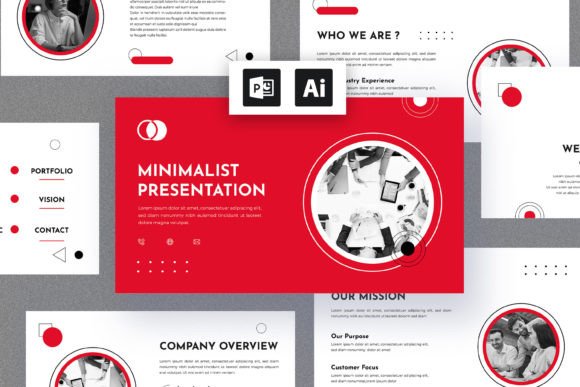
What separates a minimalist design from a plain one? It's the intentional craft behind every element. A successful minimalist slide typically features a strong, singular focal point—be it a striking image, a bold statistic, or a short, impactful quote. The typography is clean and highly readable, often using a modern sans-serif font family with clear hierarchy through size and weight. Color palettes are restrained, sometimes monochromatic with a single accent color to draw the eye. Every component on the slide earns its place; there's no room for decorative clip art or superfluous bullet points. This discipline forces clarity of thought and ensures your audience absorbs information effortlessly.
Why This Style Resonates in Modern Business Communication
The appeal of minimalist design extends far beyond aesthetics. For professionals—from startup founders pitching investors to marketers launching a new campaign—this style offers concrete advantages. First, it enhances visual consistency. Using a limited set of design rules across all slides creates a cohesive brand experience, reinforcing brand recognition. Second, it dramatically improves readability. Clean slides with high-contrast text are easier to digest, even from the back of a room or on a small screen during a virtual meeting. This professionalism builds credibility. Finally, it boosts audience engagement. When viewers aren't struggling to parse a crowded slide, they can focus on your narrative, ask better questions, and remember your key takeaways.
Practical Applications for Your Next Project
Consider how this approach can elevate specific business scenarios:
- Investor Pitches & Funding Decks: You need to convey complex data and a compelling vision quickly. Minimalist slides with clear data visualization and powerful imagery help maintain focus and exude confidence.
- Client Presentations & Reports: Showcasing results or proposals in a clean, organized format demonstrates respect for the client's time and makes your recommendations stand out.
- Internal Training & Workshops: Facilitate learning by using slides as visual anchors rather than script readers. Key points paired with relevant icons or diagrams aid memory retention.
- Marketing & Sales Collateral: A minimalist template can be adapted for product launches, social media carousels, or webinar decks, ensuring all external communications look polished and on-brand.
The versatility of a well-structured minimalist template means you can repurpose it for quarterly updates, team briefings, or public speaking events with minimal redesign effort.
Integrating Minimalism with Your Overall Brand Identity
Your presentation should feel like a natural extension of your brand. If your brand identity uses a specific serif font for headings and a sans serif font for body text, your slides should mirror that pairing. The color scheme should pull from your established palette. This alignment doesn't just look professional; it builds subconscious trust. Think of your presentation as a temporary website or a printed brochure—every touchpoint should tell the same visual story. A minimalist framework makes this integration seamless, as the limited elements are easier to customize to fit your existing logo design and packaging design guidelines.
Getting Started: Tools and Resources
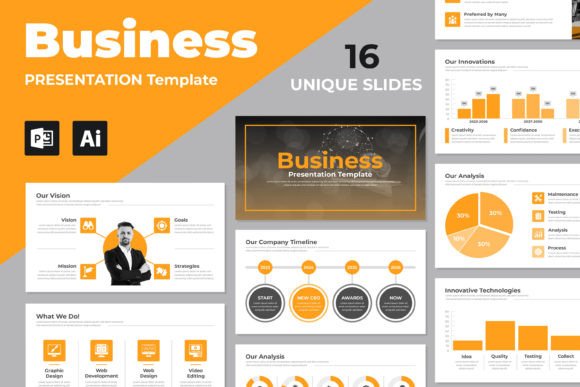
You don't need to be a professional designer to achieve a minimalist look. Start by auditing your current slides: remove any element that doesn't directly support your spoken words. Embrace white space as a design element, not wasted space. For those looking for a head start, consider using a professionally designed presentation template. A high-quality design asset like a multipurpose business presentation kit often includes pre-built slide layouts, infographic elements, and chart styles that already follow minimalist principles. These are typically available in PowerPoint (PPTX) or Illustrator (EPS) formats, are 100% editable, and come with documentation to help you customize fonts and colors quickly. This allows you to focus on your content and delivery, confident that the visual foundation is strong.
Ultimately, minimalist presentation design is a strategic choice. It prioritizes your message, respects your audience's cognitive load, and projects an image of clarity and competence. By stripping away the unnecessary, you give your ideas the spotlight they deserve.