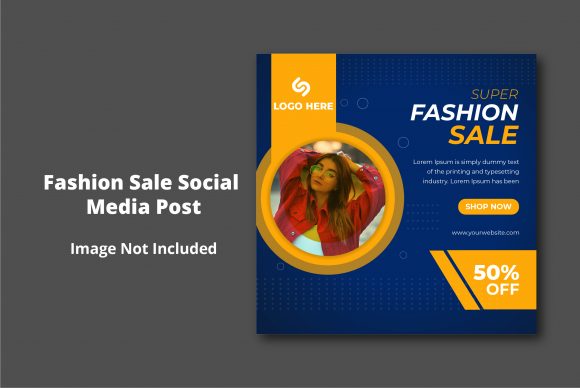
Designing a High-Impact Fashion Sale Social Media Post
Running a successful sale in the fashion industry is about more than just slashing prices; it is about creating a sense of urgency, exclusivity, and visual desire. In a crowded digital landscape where users scroll through hundreds of images a minute, a generic text post announcing a discount simply will not cut it. You need a visual asset that stops the thumb, captures the brand’s aesthetic, and communicates the offer instantly. This is exactly where a high-quality design template becomes an invaluable tool for designers, small business owners, and content creators alike. By utilizing a professional Fashion Sale Social Media Post template, you bridge the gap between professional graphic design and the fast-paced demands of digital marketing.
Created specifically for Adobe Illustrator and Photoshop, this type of template is not just a static image; it is a dynamic design asset. It allows you to maintain the high-end look required for fashion branding while accommodating the practical needs of a sale announcement. Whether you are a boutique owner preparing for a seasonal clearance or a marketing agency handling multiple clients, having a structured, easy-to-edit file streamlines your workflow significantly.
The Anatomy of an Effective Sale Graphic
What makes a social media post visually appealing? It usually comes down to the hierarchy of information and the mood set by the typography and color palette. A well-designed Fashion Sale Social Media Post template usually features a modern layout that balances negative space with bold typography. Because it is built in Adobe Illustrator (AI files), the vector nature of the design ensures that your graphics remain crisp and clear whether they are viewed on a high-resolution mobile screen or a desktop monitor.
The use of RGB color mode in these assets is crucial for digital-first strategies. Unlike print design which uses CMYK, RGB is optimized for the luminosity of screens, ensuring your reds are vibrant and your blacks are deep. Furthermore, the inclusion of free fonts is a massive practical benefit. Licensing for premium fonts can be expensive and complex. By using a template that incorporates high-quality, free fonts, you eliminate the risk of copyright infringement while maintaining a professional aesthetic. This allows you to focus on the creative aspect—matching the typography to your brand's voice—without worrying about legalities or additional costs.
Bridging the Gap Between Digital and Print
While the primary use case is digital marketing, the versatility of a high-resolution design file extends far beyond Instagram or Facebook. Because these templates are optimized for printing at 300 DPI, they serve a dual purpose. Imagine you are a small business owner planning a pop-up shop. You need a cohesive brand identity that spans both your online announcement and your physical signage.
With a print-ready file, you can take your social media graphic and adapt it for:
- In-Store Posters: Print large-scale versions of your sale graphic to hang in your window display, driving foot traffic from passersby.
- Packaging Inserts: Include a mini version of the sale graphic as a flyer inside shipped orders to encourage repeat business.
- Event Invitations: If your sale is tied to a VIP shopping event, the design can be repurposed into digital or physical invitations.
- Merchandise: For brands that sell tote bags or stickers, the graphic elements can be extracted to create limited-edition merchandise.
This cross-channel consistency is vital for brand recognition. When your Instagram story looks identical to the poster in your shop window, you reinforce your brand identity in the customer's mind.
Practical Workflow for Creatives and Entrepreneurs
One of the standout features of a professional template package is the "Easy to Edit" nature of the files. For a busy entrepreneur or a freelance designer, time is money. A template that requires hours of layer management is counterproductive. The inclusion of a Help Guide is a testament to user-centric design, ensuring that even those with intermediate skills in Adobe Photoshop or Illustrator can navigate the file structure.
When approaching the customization of your Fashion Sale Social Media Post, consider the following workflow to maximize efficiency:
- Brand Alignment: Before opening the file, have your brand hex codes ready. Swap out the template’s default colors for your specific palette to ensure the post feels native to your feed.
- Typography Pairing: The template likely comes with a specific typographic style. If you choose to change the font, ensure you test pairings carefully. A bold sans-serif header often pairs well with a delicate serif body text, but avoid using more than two typefaces to prevent visual clutter.
- Image Selection: The layout is a frame for your product. Ensure your product photography is high-quality. If the template uses a clipping mask for an image, choose a photo with good lighting and a clear focal point.
- Call to Action (CTA): Ensure your CTA (e.g., "Shop Now," "Swipe Up," "Use Code SAVE20") is legible and distinct from the rest of the design.
Enhancing Brand Recognition Through Design Assets
In the world of web design and social media graphics, consistency is the currency of trust. When a potential customer sees a disjointed feed—one post looks professional, the next looks amateurish—they subconsciously question the legitimacy of the business. Using a cohesive set of design assets, such as a Fashion Sale Social Media Post template, helps maintain a polished editorial look.
This approach is particularly effective for editorial design and packaging design. The visual language you establish in your sale promotion should feel like a natural extension of your regular content. For example, if your brand usually relies on minimalist aesthetics with lots of white space, a chaotic, neon-colored sale template might confuse your audience. Conversely, if your brand is bold and maximalist, a subdued template won't generate the necessary excitement.
By selecting a template that aligns with your existing brand identity, you are not just creating a post; you are building a library of marketing assets. You can adapt the layout for future campaigns, seasonal changes, or different product lines. This scalability is what separates a one-off design from a sustainable visual strategy.
Maximizing Readability and Audience Engagement
Ultimately, the goal of a Fashion Sale Social Media Post is conversion. However, conversion is impossible if the message is lost in the design. Readability is paramount. When customizing your template, pay close attention to the contrast between the text and the background. A light grey text on a white background might look chic, but it is difficult to read on a small mobile screen.
Consider the hierarchy of your information:
- The Hook: "50% Off" or "Flash Sale" needs to be the largest, most visible element.
- The Context: "Spring Collection" or "All Dresses" tells them what is on sale.
- The Action: "Link in Bio" or "Code: STYLE" tells them how to buy.
Modern typography trends often favor display fonts for headers to grab attention, paired with clean sans-serif fonts for the details. However, readability must always trump style. If you are using a script font or handwritten font, ensure the letterforms are distinct enough to be read at a glance. Avoid overly decorative fonts for essential information like dates or discount codes.
Furthermore, think about the emotional impact. A premium font style conveys luxury, while a rounded, playful typeface might suggest a more casual, youth-oriented brand. By leveraging the flexibility of the AI and PSD files provided, you can tweak these subtle details to perfectly match the psychological profile of your target audience.
The Versatility of Vector and Raster Files
Having access to both Adobe Illustrator (AI) and Adobe Photoshop (PSD) files offers a significant advantage. Vector files (AI) are infinitely scalable. You can resize your sale graphic to fit a massive billboard or a tiny website banner without losing quality. This is essential for logo design and large-format printing.
Raster files (PSD), on the other hand, are excellent for incorporating complex photo editing, filters, and textures that are common in fashion imagery. The ability to switch between these formats depending on the project requirement—whether it is a digital product download or a physical print run—makes this type of template a powerhouse tool in your creative arsenal.
In conclusion, a Fashion Sale Social Media Post