Land Your Dream Job: The Ultimate Resume CV Template
That sinking feeling when you hit "submit" on a job application, only to hear nothing back, is frustratingly common. Often, the issue isn't your experience or skills—it's how you're presenting them. A cluttered, generic, or poorly formatted resume can get lost in a pile, never even reaching the hands of a hiring manager. This is where a professionally designed Resume CV Template becomes your secret weapon, transforming your career narrative from a simple document into a compelling visual story that opens doors.
Beyond the Basic Document: Why Design Matters
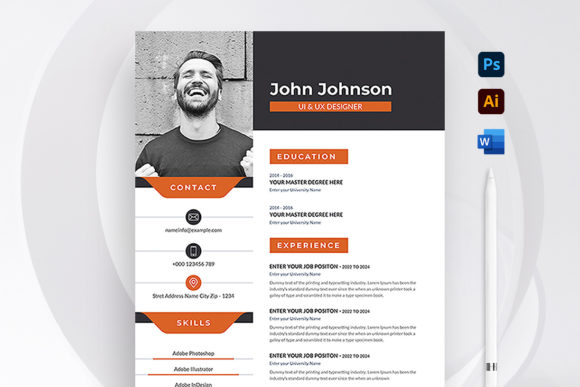
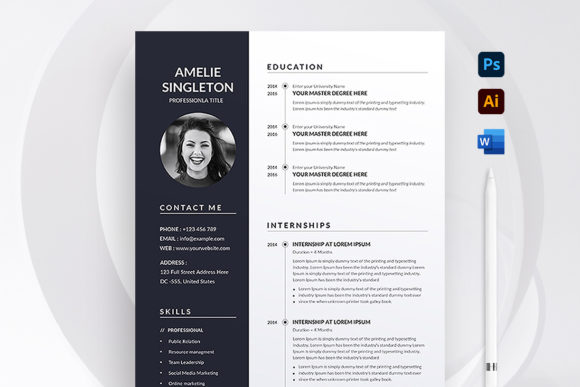
Think of your resume as your personal brand's most critical marketing asset. Just as a business carefully designs its logo and packaging to make a strong first impression, your resume must do the same for you. A premium template does more than just list your jobs; it uses modern typography, clean layout, and strategic white space to guide the reader's eye. This isn't about flashy graphics; it's about professional presentation and visual consistency that communicates competence and attention to detail before a single word is read.
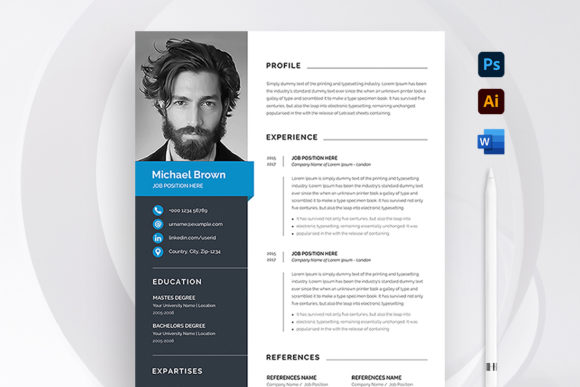
This particular template is built on that principle. Created in Adobe Photoshop and Microsoft Word, it’s designed for readability and impact. The A4 paper size is standard for professional documents, and the 300 DPI, CMYK color settings ensure it looks crisp and accurate whether viewed on a screen or printed. The bleed setting means if you choose to print it professionally, the design extends perfectly to the edge, giving it a polished, publication-quality feel.
Tailoring Your Story: From Generic to Personalized
A one-size-fits-all approach rarely works in job hunting. The true power of a well-organized template lies in its editability. This is where the "super easy to edit" feature becomes invaluable. Because all objects, colors, & text are editable, you can quickly adapt your resume for different industries or roles.
Applying for a creative role at a startup? You might adjust the color scheme to something more vibrant. Targeting a senior position in finance? You can revert to a more conservative, serif font for a traditional feel. The ability to customize easily in MS Word & PSD means you're not starting from scratch each time; you're strategically refining a strong foundation. This process is akin to a designer adjusting a logo design for different applications—it maintains core brand identity while fitting the specific context.
The Anatomy of an Effective Application Package
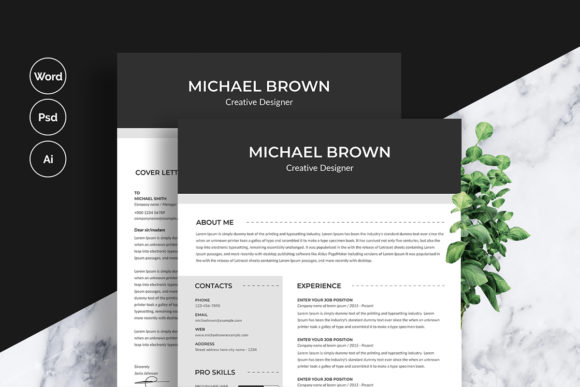
A powerful application is more than just a resume. This template package understands that, providing a cohesive set of design assets. The included cover letter template ensures your introductory note matches your resume's visual characteristics, creating a unified brand identity for yourself. This consistency is crucial—it shows you understand professional communication and care about details.
The files included—Microsoft Word (.docx), Photoshop (.psd), and Illustrator (.ai)—cover the most common tools used by professionals and designers alike. The detailed instructions file and font download links remove technical guesswork, letting you focus on content. This is practical support, much like a packaging design kit that includes guidelines for print and digital use, ensuring a seamless process from creation to final output.
Practical Steps for a Standout Resume
With your template ready, the real work begins: crafting your content. Here’s how to maximize the template's potential:
- Choose the Right Font Style: The template likely uses a clean, professional sans serif font or a classic serif font. Stick to these for body text to ensure readability. You can use a slightly more distinctive font for your name or headers, but avoid script fonts or overly decorative display fonts for large blocks of text.
- Match Typography to Your Goal: Let the job description guide you. A tech company might appreciate a modern, geometric sans serif typeface, while a law firm might expect a traditional serif. The template's editability allows you to make this shift easily.
- Test Your Pairings: If you decide to change the fonts, always test how they look together. A good rule is to pair a sans serif with a serif for contrast and hierarchy. Ensure there's enough difference in weight and style to create clear sections.
- Focus on Readability: Use the template's structure to your advantage. Break up text with bullet points (like these), use bold for job titles and companies, and maintain ample margins. Your goal is to make the hiring manager's job easy—they should be able to scan for key information in seconds.
- Leverage the File Formats: Edit your base content in Microsoft Word for its text-handling ease. For final tweaks to layout, color, or graphics, use the Photoshop or Illustrator files. This hybrid approach gives you both convenience and creative control.
From Application to Interview: The Visual Advantage
In a competitive job market, small details create big differences. A resume that demonstrates visual consistency and professional care does more than list your qualifications; it shows you think like a professional. It hints at your understanding of brand identity, your ability to present information clearly, and your commitment to quality—all traits employers value.
This Resume CV Template is more than a file; it's a tool for strategic self-presentation. It provides the structure and polish of a premium font or design asset, freeing you to focus on what truly matters: articulating your unique value and story. So before you send out that next application, invest the time to tailor your resume. It’s the first step in turning a silent submission into a conversation, and ultimately, into your next career opportunity.