Resume Template | Modern Resume: Craft Your Professional Narrative
Let’s be honest—your resume is often the first handshake with a potential employer, and in a competitive job market, that first impression needs to be firm, confident, and memorable. You could spend hours wrestling with formatting in a word processor, only to end up with a document that looks cluttered or outdated. Or, you could start with a foundation built for clarity and impact. This is where a thoughtfully designed template steps in, not as a shortcut, but as a strategic tool to present your experience with the professionalism it deserves. It’s about ensuring your skills and story aren’t buried under poor layout choices, but are front and center, exactly where they belong.
More Than Just a Pretty Layout: The Anatomy of an Effective Design
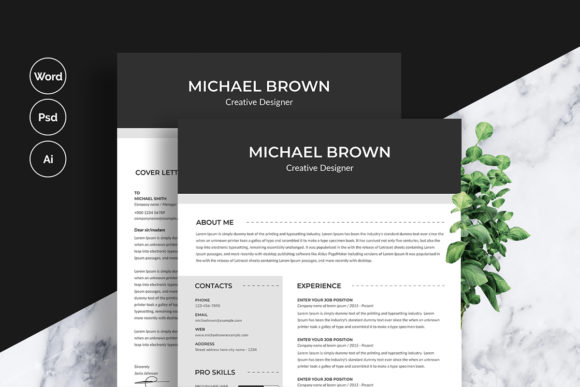
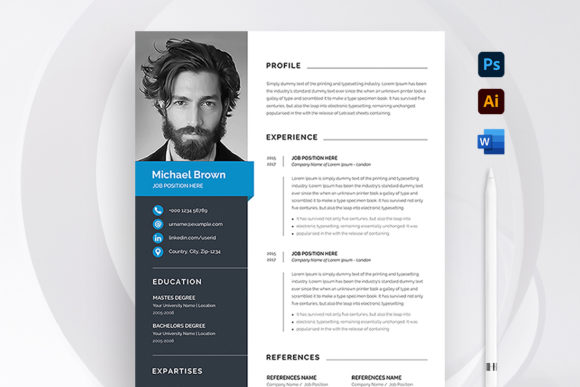
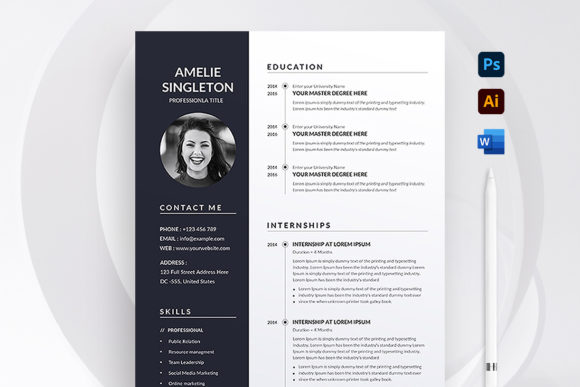
What separates a mediocre resume from one that lands interviews? It’s often in the details. This particular Modern Resume template is engineered with a clean, contemporary aesthetic that prioritizes readability and visual hierarchy. The use of ample white space guides the recruiter’s eye naturally from your contact information to your professional summary, through your experience, and down to your skills. Typography plays a crucial role here; the chosen fonts are not just modern—they are selected for their clarity at both screen and print resolutions, ensuring your document looks impeccable whether it’s viewed on a laptop, printed out, or scanned by an applicant tracking system (ATS).
The technical specifications are built with the end goal in mind: a flawless print-ready file. Being set to A4 size with precise bleed settings (0.25 inches) and a high-resolution 300 DPI in CMYK color mode means you can send it directly to a professional printer without a second thought. This attention to technical detail removes a significant barrier, especially for those who may not be design professionals but still need a document that meets industry standards. It’s a blend of aesthetic sensibility and practical engineering.
Flexibility for Your Unique Career Path
One of the biggest frustrations with generic templates is their rigidity. You try to add a new section for a portfolio link or a certification, and the entire layout breaks. This template is built for adaptability. Delivered in both Microsoft Word (.docx) and Adobe Photoshop (.psd) formats, it gives you control. If you’re comfortable with Word and just need to update text and maybe swap a color, you can do that quickly and easily. Every element—from the section headers and icons to the color blocks and text frames—is fully editable.
For those with a bit more design experience or a specific brand color to incorporate, the Photoshop file offers deeper customization. You can adjust kerning, leading, and tracking to perfect the typographic feel, or manipulate graphical elements to better match a personal brand. This dual-format approach respects your existing skill set and workflow. The included Illustrator (.ai) file is a bonus for vector-based adjustments, and the detailed instructions file is a lifeline, walking you through the customization process step-by-step, ensuring you don’t miss a beat.
Beyond the Job Application: A Versatile Design Asset
While its primary purpose is to secure your next role, the design principles embedded in this template have broader applications. Think of it as a masterclass in editorial design and brand identity condensed into a single page. The way it uses typographic hierarchy, consistent alignment, and strategic color accents is exactly what you’d see in a well-designed brochure, a product spec sheet, or a professional bio for a conference speaker.
For small business owners and entrepreneurs, the template’s structure can be repurposed. Imagine using the layout as a starting point for a company capabilities overview or a project proposal template. The clean lines and professional presentation instantly convey credibility. Content creators and marketers can deconstruct its design language to create consistent social media graphics or blog post headers. The font pairing and color scheme can become part of a broader visual toolkit, ensuring visual consistency across all your digital and print materials.
Practical Tips for Making It Your Own
Having a great template is the starting point; personalizing it effectively is what makes it work for you. Here’s how to approach customization strategically:
- Align with Your Industry: A creative director in advertising might lean into the more stylized aspects of the template, perhaps using a bolder color for section headers. An accountant or engineer, however, might stick to the classic, subdued version to emphasize reliability and precision. The template’s neutral foundation allows for both.
- Test Your Typography Choices: The template uses free fonts, with download links provided. Before you finalize, print a test page or view it on multiple devices. Check that the font sizes for your body text (typically 10-12pt) are comfortable to read in long paragraphs, and that your headings stand out clearly without being overpowering.
- Prioritize Content Over Decoration: It can be tempting to add every skill you’ve ever learned. Instead, use the clean layout to your advantage. Be ruthless in editing your bullet points to showcase achievements, not just duties. The template’s design will amplify strong, concise content; it won’t salvage weak or irrelevant information.
- Consider Commercial Licensing: While the fonts are free for personal use, if you intend to use this template to create materials for your business or clients—like designing resume templates for sale or using the layout for a freelance service proposal—it is your responsibility to verify the font licenses for commercial use. The provided links are your starting point for due diligence.
In the end, a resume is a personal marketing document. Its job is to open doors. By starting with a premium, modern template, you’re investing in a tool that removes the guesswork from presentation. You can focus your energy where it matters most: on articulating your value, your experiences, and your potential. The result is a document that doesn’t just list your history, but presents it with the professional presentation and visual clarity that today’s job market demands, helping you move from applicant to interviewee with confidence.